
InternetGuard Data Saver Firewall APK: Control App Internet Access and Save Mobile Data
Managing mobile data has become a real challenge as apps constantly run in the background, syncing, updating, and sending information without clear permission. Many users only notice the problem when their data limit is exhausted or their phone starts slowing down. InternetGuard Data Saver Firewall APK is designed to solve this exact issue by giving users full control over which apps can access the internet.
In this article, we will take a detailed look at InternetGuard Data Saver Firewall APK, how it works, its features, benefits, limitations, and whether it is worth using in 2026.
What is InternetGuard Data Saver Firewall APK
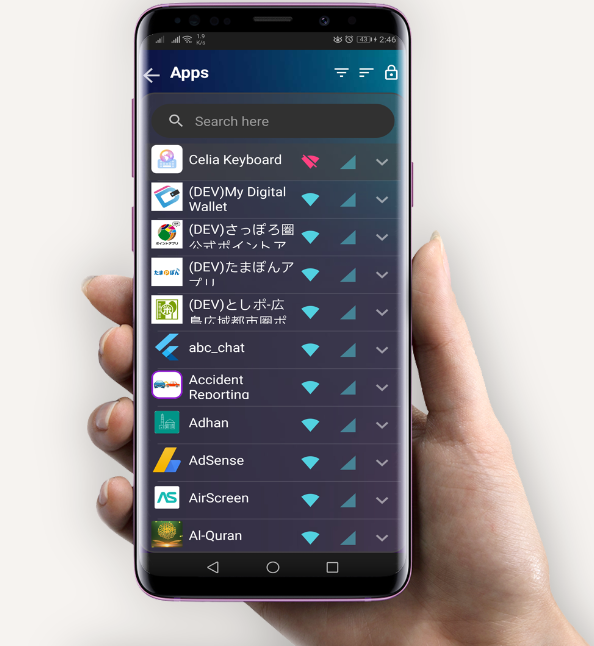
InternetGuard Data Saver Firewall APK is an Android application that allows users to block or allow internet access for individual apps. It works as a local firewall on your device, helping you control mobile data and Wi-Fi usage without requiring root access.
The app is mainly focused on privacy protection, data saving, and background activity control. By restricting unnecessary internet access, users can reduce data consumption, improve device performance, and increase battery life.
How InternetGuard Data Saver Firewall Works
InternetGuard uses a local VPN-based firewall system. This means it creates a secure local VPN connection on your device and filters internet traffic for installed apps.
No Root Required
One of the biggest advantages of InternetGuard Data Saver Firewall APK is that it does not require root access. Most users prefer non-root solutions because rooting can void warranties and cause security risks.
App-Level Internet Control
Users can manually allow or block internet access for each app separately. This gives full control over which apps can use mobile data or Wi-Fi.
Key Features of InternetGuard Data Saver Firewall APK
App Internet Blocking
InternetGuard allows you to block internet access for specific apps. You can stop social media apps, games, or background services from using data when they are not needed.
Mobile Data and Wi-Fi Control
The app lets you control mobile data and Wi-Fi separately. For example, you can allow an app to use Wi-Fi but block mobile data to avoid unnecessary data usage.
Real-Time Data Monitoring
InternetGuard shows real-time data usage for apps. This helps users understand which apps consume the most data and take action accordingly.
Privacy Protection
Many apps send data in the background without user knowledge. InternetGuard blocks unwanted connections, helping protect personal information and improve privacy.
Lightweight and Simple Interface
The app is lightweight and does not slow down the device. The interface is clean, simple, and easy to understand, even for non-technical users.
Background App Control
By blocking background internet access, the app helps reduce unnecessary syncing, ads loading, and tracking activities.
Benefits of Using InternetGuard Data Saver Firewall APK
Saves Mobile Data
Blocking unnecessary background internet access can significantly reduce mobile data usage, especially for users on limited data plans.
Improves Battery Life
Apps using the internet in the background drain battery. InternetGuard helps extend battery life by limiting background activity.
Better Device Performance
When fewer apps are running network tasks in the background, the device performs more smoothly with less lag.
Increased Privacy and Security
InternetGuard prevents apps from sending data without permission, reducing the risk of tracking and data leakage.
No Root Risk
Since the app works without root, it is safe for regular users and does not interfere with system stability.
User Interface and Experience
InternetGuard Data Saver Firewall APK offers a clean and minimal design. All installed apps are listed clearly, making it easy to manage permissions.
Users can enable or disable internet access with a single tap. The settings menu is simple, and the app does not overwhelm users with complex options.
The overall experience feels smooth and reliable, even on low-end Android devices.
Compatibility and System Requirements
InternetGuard Data Saver Firewall APK is compatible with most Android devices running modern Android versions. Since it uses a local VPN method, users should note that only one VPN can run at a time on Android.
This means you cannot use another VPN service while InternetGuard is active.
Limitations of InternetGuard Data Saver Firewall APK
No Multiple VPN Support
As mentioned, the app uses a local VPN, so it cannot run alongside other VPN applications.
Free Version Restrictions
Some advanced features may be limited in the free version, depending on updates and app policies.
Manual Configuration Required
Users need to manually configure which apps can access the internet. While this gives control, it may require some initial setup time.
Is InternetGuard Data Saver Firewall Safe to Use
InternetGuard Data Saver Firewall APK is generally considered safe when downloaded from a trusted source like the Google Play Store. It does not require root access and does not modify system files.
The app operates locally and does not route traffic through external servers, which is a positive sign for privacy-focused users.
Who Should Use InternetGuard Data Saver Firewall APK
This app is ideal for:
-
Users with limited mobile data plans
-
People concerned about app privacy and tracking
-
Users experiencing fast battery drain
-
Anyone who wants better control over background app activity
It is especially useful for students, travelers, and users in areas with expensive or slow internet connections.
Comparison with Other Data Saver Apps
Compared to basic data saver apps, InternetGuard offers more detailed control. Many data saver apps only limit background data globally, while InternetGuard allows app-by-app control.
This makes it more flexible and effective for users who want precise management rather than general restrictions.
Final Verdict on InternetGuard Data Saver Firewall APK
InternetGuard Data Saver Firewall APK is a practical and effective solution for controlling app internet access on Android devices. It delivers strong data saving features, privacy protection, and performance benefits without requiring root access.
The app is simple to use, lightweight, and suitable for both beginners and advanced users. While the VPN limitation may be a drawback for some, the overall functionality makes it a reliable choice for managing mobile data and improving device efficiency.
Conclusion
InternetGuard Data Saver Firewall APK is a useful tool for Android users who want better control over their internet usage. By allowing users to block or allow internet access on an app level, it helps save data, protect privacy, and improve battery life.
If you are looking for a straightforward, non-root firewall app that focuses on data saving and privacy, InternetGuard Data Saver Firewall APK is definitely worth trying in 2026.
1 thought on “InternetGuard Data Saver Firewall APK: Control App Internet Access and Save Mobile Data”