
Rolling Icons App Review : Customize App and Photo Icons Like a Pro
Mobile customization has become more than just changing wallpapers. Users now want complete control over how their home screen looks and feels. From widgets to launchers, every small detail matters. One app that is gaining attention in this space is Rolling Icons – App and Photo Icons.
This app focuses on transforming static app icons into eye-catching rolling icons, adding movement and personality to Android home screens. In this article, we take a detailed and honest look at the Rolling Icons app, its features, performance, usability, and whether it is worth installing in 2026.
What Is Rolling Icons – App and Photo Icons
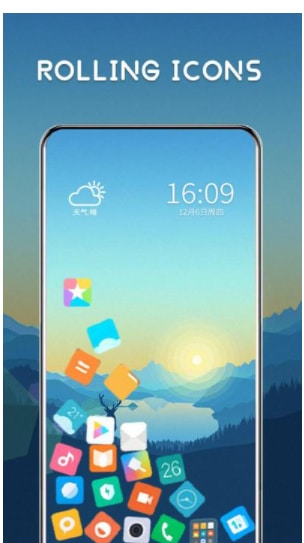
Rolling Icons – App and Photo Icons is an Android customization app designed to modify the appearance of app icons and photo shortcuts. Instead of traditional flat icons, the app allows icons to appear in a rolling or rotating style, giving a dynamic look to the home screen.
The app is mainly targeted at users who enjoy creative and animated layouts without needing advanced technical knowledge. It works alongside launchers and does not require root access, which makes it accessible to most Android users.
Key Features of Rolling Icons App
Animated Rolling Icon Styles
The main highlight of the app is its rolling animation. Icons rotate smoothly, creating a unique visual effect that stands out from regular icon packs. Users can apply this effect to selected apps instead of the entire screen, which helps maintain balance.
Custom Photo Icons
Apart from app icons, Rolling Icons also allows users to turn personal photos into rolling icons. This feature is useful for shortcuts like contacts, folders, or frequently used apps. You can use your own images and apply the same rolling effect for a personalized touch.
Easy Icon Replacement
Replacing icons is straightforward. You select an app, choose an icon style or image, and apply it. No complicated steps or technical settings are involved, making it beginner-friendly.
Compatibility With Popular Launchers
The app works well with most popular Android launchers such as Nova Launcher, Lawnchair, and other third-party launchers that support icon customization. This flexibility makes it easier to integrate into existing setups.
User Interface and Experience
Simple and Clean Layout
The user interface of Rolling Icons is clean and easy to understand. Options are clearly labeled, and navigation feels intuitive even for first-time users. There is no unnecessary clutter, which helps users focus on customization.
Smooth Performance
The rolling animation is smooth on most modern Android devices. There is minimal lag, provided the phone has decent hardware. On low-end devices, users may notice slight delays if too many animated icons are active at once.
Learning Curve
The app has a very low learning curve. You do not need tutorials to get started. Most users can apply their first rolling icon within a few minutes of installation.
Customization Options in Detail
Control Over Animation Speed
Users can adjust the speed of the rolling animation. This is a useful option because not everyone prefers fast movements on their home screen. Slower animations often look more polished and less distracting.
Icon Shape and Size
The app allows control over icon size to match different launchers and grid layouts. While shape customization is limited compared to full icon packs, it still offers enough flexibility for most users.
Selective Icon Customization
One of the best things about Rolling Icons is that you do not have to apply the effect to all apps. You can customize only the icons you want, keeping important or frequently used apps visually distinct.
Battery and Performance Impact
Battery Usage
Animated elements usually raise concerns about battery drain. Rolling Icons is fairly optimized, but using too many rolling icons can slightly increase battery usage. For best results, it is recommended to apply the animation to a limited number of icons.
System Resource Consumption
The app runs in the background only when necessary. On mid-range and high-end devices, the impact on RAM and CPU is minimal. Older devices may experience some slowdown if multiple animations are active.
Ads and In-App Purchases
Free Version Experience
The free version of Rolling Icons includes ads. These ads are generally non-intrusive and do not interrupt the customization process too often. However, frequent users may find them slightly distracting.
Premium Features
Some advanced options and ad-free experience are locked behind in-app purchases. The pricing is reasonable compared to other customization apps, and the premium version improves overall usability.
Privacy and Permissions
Required Permissions
The app requires standard permissions related to storage access for selecting photos and applying icons. It does not ask for unnecessary or sensitive permissions, which is a positive sign.
Data Safety
According to Play Store information, the app does not collect personal data beyond what is required for functionality. Users should still review the privacy policy before installation, especially if using personal photos.
Pros and Cons of Rolling Icons App
Pros
-
Unique rolling animation for app icons
-
Easy to use and beginner-friendly
-
Supports custom photo icons
-
Works with popular Android launchers
-
No root required
Cons
-
Limited customization compared to full launchers
-
Slight battery impact if overused
-
Ads in the free version
Who Should Use Rolling Icons
Rolling Icons – App and Photo Icons is ideal for users who want a visually appealing home screen without completely changing their launcher. It suits people who enjoy subtle animations and creative layouts but still want simplicity.
If you are someone who likes minimal setups or values battery life above all, you may prefer using this app selectively rather than applying rolling icons everywhere.
Comparison With Similar Apps
Compared to traditional icon packs, Rolling Icons focuses more on animation than design variety. Unlike full launchers, it does not replace your entire home screen experience. Instead, it complements existing setups.
This makes it a good middle-ground solution for users who want something different without committing to a full launcher overhaul.
Final Verdict
Rolling Icons – App and Photo Icons is a creative and practical customization app that delivers exactly what it promises. It adds motion and personality to Android home screens while keeping the setup process simple and accessible.
The app is not meant to replace launchers or advanced theming tools. Instead, it works best as an add-on for users who want animated icons without complexity. With careful use, it offers a fresh look without compromising performance.
Conclusion
In 2026, Android customization continues to evolve, and apps like Rolling Icons – App and Photo Icons play an important role in that journey. The app offers a unique rolling animation feature, supports custom photo icons, and works smoothly with most launchers.
If you are looking for a simple way to make your home screen stand out while staying within Google policies and system limits, Rolling Icons is worth trying. Used smartly, it can enhance your phone’s appearance without making it feel overdone.