
Remove.bg Review 2026: Automatically Remove Image Backgrounds in Seconds
Image background removal used to be a time consuming task that required professional design skills. Today, tools like remove.bg have changed the game completely. This app allows anyone to remove image backgrounds automatically within seconds, without manual editing or complex software.
In this article, we take a detailed look at remove.bg – Remove Image Backgrounds Automatically, covering its features, performance, real world usage, pros and cons, and whether it is worth using in 2026. This review is written to help beginners, bloggers, designers, and small business owners make an informed decision.
What is remove.bg
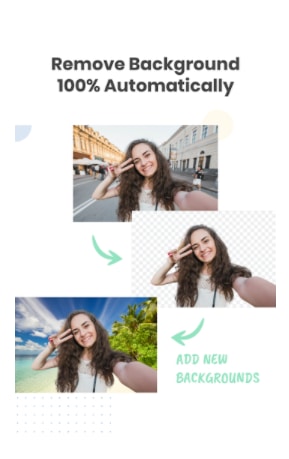
remove.bg is an AI powered background removal tool that instantly separates the main subject from the background of an image. The app is designed for speed and simplicity. You upload an image, and within a few seconds, the background is removed automatically.
The app works on photos of people, products, animals, cars, graphics, and more. It is widely used by content creators, online sellers, marketers, and developers who need clean images without spending hours editing.
remove.bg is available as a web tool, desktop software, API, and a mobile app on the Play Store, making it accessible for different types of users.
How remove.bg Works
The working process of remove.bg is simple and fully automated.
AI Based Background Detection
remove.bg uses advanced artificial intelligence trained on millions of images. The AI identifies the foreground subject and separates it from the background accurately, even in complex images with fine details like hair or shadows.
Automatic Processing
Once an image is uploaded, the system processes it instantly. There is no need to manually draw selection lines or use brushes. This makes it suitable for users with no editing experience.
Clean Transparent Output
After processing, the app provides an image with a transparent background. You can download it as a PNG file or add a new background if needed.
Key Features of remove.bg
remove.bg offers several useful features that make it stand out from traditional photo editing tools.
One Click Background Removal
The biggest highlight of remove.bg is its one click functionality. Upload the image, wait a few seconds, and the background is gone. This saves a lot of time, especially when working with multiple images.
High Quality Edge Detection
The app does a good job handling fine edges like hair, fur, and curved objects. In most cases, the cutout looks natural and professional without manual touchups.
Manual Edit Options
Although the process is automatic, remove.bg also provides basic manual editing tools. Users can erase or restore specific areas if the AI misses something.
Background Customization
After removing the background, users can add a solid color, gradient, or custom background image. This is helpful for product photos and marketing visuals.
API and Integration Support
remove.bg provides an API for developers and businesses. This allows background removal to be integrated directly into apps, websites, or workflows.
User Interface and Ease of Use
The user interface of remove.bg is clean and beginner friendly. The app does not overwhelm users with unnecessary tools or menus.
Uploading images is straightforward, and the results are displayed clearly. Buttons are labeled properly, and even first time users can understand how to use the app without guidance.
The mobile app follows the same simplicity, making it easy to use on smartphones without performance issues.
Image Quality and Accuracy
Image quality is one of the most important factors in background removal tools.
remove.bg generally delivers accurate results with clean edges and minimal distortion. In portrait photos, hair detection works well in most lighting conditions. Product images with simple backgrounds are processed almost perfectly.
However, images with very complex backgrounds or low contrast between subject and background may need minor manual adjustments. This is expected in any automated tool and does not significantly affect usability.
Performance and Speed
remove.bg is extremely fast. Most images are processed within 3 to 5 seconds, depending on image size and internet speed.
The app runs smoothly on both low end and high end devices. There are no noticeable crashes or freezes during normal usage.
For users who handle bulk images, the speed advantage makes a big difference in productivity.
Free vs Paid Version
remove.bg offers both free and paid options.
Free Version Limitations
The free version allows background removal but comes with certain limitations. Downloaded images are lower resolution, which may not be suitable for professional or print use.
Free users also have limited access to advanced features and credits.
Paid Plans and Benefits
Paid plans unlock high resolution downloads, better quality output, bulk processing, and API access. For designers, eCommerce sellers, and agencies, the paid version provides good value.
The pricing structure is flexible, allowing users to choose based on their usage needs.
Real World Use Cases
remove.bg is useful across different industries and professions.
Bloggers and Content Creators
Bloggers can create clean featured images, thumbnails, and graphics without relying on complex editing tools.
Online Sellers and eCommerce
Product images with white or transparent backgrounds are essential for online stores. remove.bg helps sellers maintain a professional look quickly.
Marketing and Social Media
Marketers can create ads, banners, and promotional visuals easily by placing subjects on custom backgrounds.
Developers and Automation
With API support, developers can automate background removal for apps and platforms that handle user uploaded images.
Pros and Cons of remove.bg
Pros
-
Very easy to use
-
Fast background removal
-
Good accuracy for most images
-
Works on multiple platforms
-
API support for automation
Cons
-
Free version has resolution limits
-
Complex images may need manual edits
-
Requires internet connection
Privacy and Data Security
remove.bg processes images on cloud servers. According to its policy, uploaded images are handled securely and are not stored permanently unless required for processing.
For businesses and sensitive data, the platform also offers solutions that meet professional security standards.
Still, users should avoid uploading highly confidential images unless they are using enterprise level plans.
Comparison with Similar Apps
Compared to traditional photo editors, remove.bg is faster and easier but offers fewer creative tools. Compared to other AI background removers, it stands out due to accuracy, speed, and reliability.
While some apps offer free high resolution downloads, they often lack consistency. remove.bg maintains quality across different image types, which makes it a trusted option.
Is remove.bg Worth Using in 2026
If your goal is quick and clean background removal without learning complex software, remove.bg is definitely worth using. It saves time, improves workflow efficiency, and delivers professional looking results.
For casual users, the free version is sufficient. For professionals and businesses, the paid plans justify their cost through quality and speed.
Conclusion
remove.bg – Remove Image Backgrounds Automatically is a powerful and reliable tool for anyone who works with images regularly. Its AI driven approach removes the need for manual editing and allows users to achieve clean results in seconds.
The app is easy to use, fast, and accurate for most use cases. While the free version has some limitations, the overall experience remains smooth and practical. For bloggers, online sellers, marketers, and developers, remove.bg can be a valuable addition to their toolkit.
If you are looking for a simple and effective way to remove image backgrounds in 2026, remove.bg is a solid choice that delivers on its promise.