Best Windows 10 Mobile Launcher for Android: Top Picks for a PC-Like Experience
Android is known for its flexibility, and one of its biggest strengths is customization. Many users love experimenting with different launchers to change the entire look and feel of their phone. Among these, Windows 10 mobile launchers have gained steady popularity. They offer a clean interface, live tiles, and a desktop-like experience that feels both modern and productive.
In this article, we will explore the best Windows 10 mobile launcher for Android, why people prefer it, its features, benefits, limitations, and whether it is a good choice for daily use. This guide is written to help beginners and regular users make an informed decision.
What Is a Windows 10 Mobile Launcher for Android
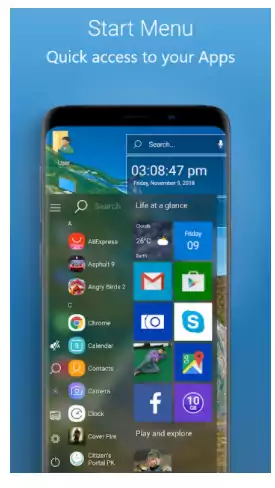
A Windows 10 mobile launcher is an Android launcher designed to replicate the look and behavior of Microsoft’s Windows 10 mobile interface. Instead of the usual app drawer and icon grid, these launchers use tiles, smooth transitions, and a structured layout similar to Windows phones.
These launchers do not change your Android system. They only modify the home screen, icons, and navigation style. You can install or remove them anytime without risking your device.
Why Users Prefer Windows 10 Style Launchers
Clean and Minimal Design
Windows 10 launchers focus on simplicity. The tile-based layout looks organized and clutter-free. For users who prefer a professional or productivity-focused interface, this style feels more practical than flashy themes.
Live Tile Experience
One of the biggest attractions is live tiles. These tiles can show real-time updates like weather, time, battery status, or notifications directly on the home screen without opening apps.
PC-Like Feel on Mobile
Many users who work on Windows PCs enjoy having a similar interface on their phones. It creates a sense of familiarity and consistency across devices.
Best Windows 10 Mobile Launcher for Android
Launcher 10
Launcher 10 is widely considered the best Windows 10 mobile launcher available on the Play Store. It closely follows Microsoft’s Fluent Design and offers a smooth, reliable experience.
Key Features of Launcher 10
-
Authentic Windows 10 style live tiles
-
Fully resizable and customizable tiles
-
Vertical scrolling layout similar to Windows phones
-
Light and dark theme support
-
Icon pack compatibility
-
Smooth animations with low resource usage
Launcher 10 balances performance and design very well. It works smoothly on both low-end and high-end Android devices.
SquareHome Launcher
SquareHome is another strong option for users who want a Windows-like interface with deeper customization.
Why SquareHome Is Popular
-
Highly customizable tile layouts
-
Widget support inside tiles
-
Backup and restore options
-
Gesture controls
-
Works well on tablets and large screens
SquareHome gives more control to advanced users, though beginners may need some time to adjust settings.
Computer Launcher
Computer Launcher is designed for users who want a desktop-style Windows experience rather than a mobile one.
Main Highlights
-
Windows-like taskbar and start menu
-
File explorer shortcut on home screen
-
My Computer style storage access
-
Suitable for productivity users
This launcher focuses more on functionality than visual accuracy, making it useful for work-oriented users.
Features to Look for in a Windows 10 Launcher
Performance and Smoothness
A good launcher should not slow down your phone. Live tiles and animations must remain smooth even on mid-range devices.
Customization Options
The ability to resize tiles, change colors, adjust layouts, and apply icon packs is important. This allows users to personalize the launcher according to their needs.
Battery Optimization
Poorly optimized launchers can drain battery quickly. Always choose a launcher known for stable performance and efficient background usage.
Regular Updates
Launchers that receive regular updates are more secure and compatible with the latest Android versions.
Advantages of Using a Windows 10 Mobile Launcher
Unique User Interface
You get a fresh and distinctive interface that stands out from typical Android launchers.
Better Home Screen Organization
Tiles help in organizing apps and widgets more logically, especially for users who prefer fewer screens.
Productivity Focus
The structured layout encourages faster access to important apps and information.
Limitations You Should Know
Learning Curve
Users who are used to traditional Android launchers may take time to adjust to tile-based navigation.
Limited App Drawer Style
Some Windows launchers handle app lists differently, which may not suit everyone.
Premium Features
Many advanced features are locked behind a paid version. Free versions are functional but limited.
Is a Windows 10 Launcher Safe to Use
Yes, most popular Windows 10 launchers on the Play Store are safe. They do not access personal data unnecessarily. However, it is always recommended to download apps from trusted developers and review permissions before installation.
Who Should Use a Windows 10 Mobile Launcher
-
Users who like minimal and clean UI
-
People switching from Windows phones to Android
-
Professionals who prefer a productivity-focused layout
-
Users bored with standard Android home screens
If customization and visual clarity matter to you, this type of launcher is worth trying.
Tips for Getting the Best Experience
Customize Gradually
Start with default settings and slowly adjust tiles, colors, and layouts to avoid confusion.
Use System Widgets Wisely
Avoid adding too many live tiles, as they may affect performance on older devices.
Keep Backup Enabled
If the launcher supports backup, enable it so you can restore your layout anytime.
Conclusion
Choosing the best Windows 10 mobile launcher for Android depends on your personal preference and usage style. Launcher 10 stands out as the most balanced option with an authentic design, smooth performance, and easy customization. SquareHome is ideal for users who want deeper control, while Computer Launcher suits productivity-focused users.
Windows 10 style launchers offer a refreshing alternative to traditional Android interfaces. They are simple, organized, and visually appealing without being overwhelming. If you want a clean, professional, and PC-like experience on your Android phone, trying a Windows 10 mobile launcher is definitely worth it.